


Five ELD Driver
4.561.00 Reviews
App Specs
- Version
- 4.17.1
- Updated On
- License
- Free
- Downloads
- 50,000+
- Developer
- Five ELD
- Categories
- Auto & Vehicles
- Platform
- Android
Screenshots
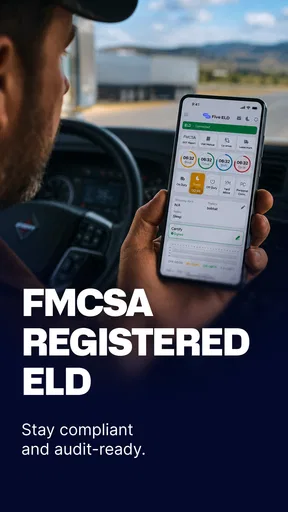
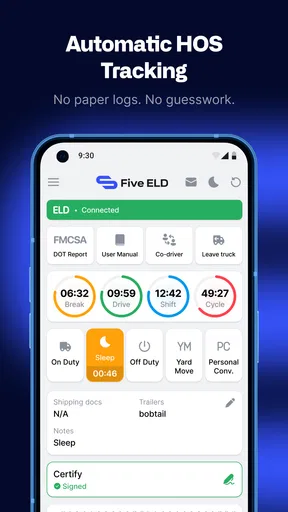
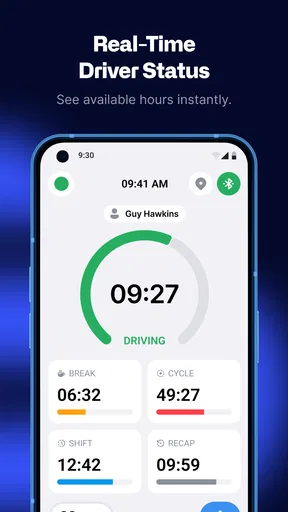
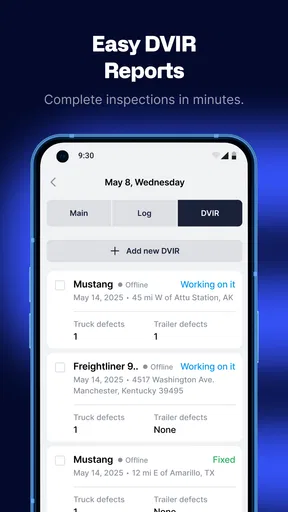

 Analysis by AppCompare
Managing driving work from a phone sounds simple until a normal day fills with status changes, paperwork, route decisions, and interruptions. Five ELD Driver is aimed at that exact working environment: it is an Auto & Vehicles app from Five ELD designed for drivers who need fleet-related tools in one mobile workspace. I found its appeal less in flashy presentation and more in the idea of keeping routine driver tasks close at hand while moving between stops.
The app is free and available to an Everyone-rated audience, which makes it easy to consider without a subscription decision at the starting line. Its current version is 4.17.0, and the product has been available since November 14, 2020. That history matters because a driver-facing tool needs to feel like an established part of a workflow rather than a temporary experiment. With over 50 thousand installs, it also sits in a practical middle ground: familiar enough to have a user base, but not so widespread that I would assume it suits every fleet automatically.
How Five ELD Driver feels during a normal shift
My first impression is that this is an app to open with a task in mind, not something to browse casually. A driver might check the current work state, handle a fleet-related update, or review information before leaving a yard. That focused approach is important on a phone, where a long chain of menus can become tiring when the user is already dealing with traffic, loading delays, or a tight handoff.
The perceived speed of an app like this is not just about how quickly a screen appears. It is also about how confidently I can tell what to do next. Five ELD Driver benefits when the workflow is familiar: open it, identify the relevant action, complete it, and return to driving duties. The less often I need to search through unrelated areas, the faster the whole experience feels, even when the phone itself is not especially powerful.
I would not judge it by the standards of a social app or a lightweight calculator. A fleet tool has a different job. It may need to preserve context, present operational information carefully, and avoid making a driver repeat work. That can make certain screens feel more deliberate than instant. In my view, that is an acceptable trade-off when clarity matters more than animation or visual polish.
What the app is best at in practical use
The strongest use case is a driver who wants one dependable mobile point for everyday fleet interaction instead of switching between unrelated tools. The store summary describes it as a suite for managing a fleet, but the useful question is how that fits a real person. I see the best match as a driver working within an organized operation where the app is part of an established process and where updates need to be made from the road environment.
For example, imagine starting a morning at a depot, checking the phone before departure, then dealing with an unexpected loading delay later in the route. The value of a driver app appears in those transitions. I would want to make the necessary update without pulling out a laptop or waiting until the end of the shift to reconstruct what happened. Five ELD Driver makes sense in that situation because its purpose is tied to the working day rather than occasional personal planning.
Worth Reading Before You Choose

EA SPORTS FC Mobile 26 Is a Bigger Football Game, but It Takes Time

Flipboard Shows What News Apps Must Do Beyond the Feed

Switching to Android Auto Means Rethinking Your Driving Routine

Google Calendar Makes a Crowded Week Easier to Manage

Ludo King Makes the Most of the Minutes Between Plans

Baby Panda World Brings Quick Play to Modern Phones, but Its Game Library Feels Busy
A useful habit is to open the app before the vehicle moves, not while driving. I would complete the routine checks and updates while parked, then use later interactions only when safely stopped. That sounds obvious, but it changes how usable the product feels. A screen that seems perfectly manageable at a desk can become frustrating when used one-handed beside a loading bay or under time pressure.
Another practical tip is to treat the app as the operational record for the moment, rather than keeping a second handwritten process “just in case.” Duplicating every action creates more opportunities for mismatched information. At the same time, I would keep any company-required backup procedure available until a fleet manager has confirmed that the mobile workflow is sufficient. The right balance depends on how the employer uses the system, not just on the app’s presence on a phone.
Heavy-use moments reveal the real experience
The demanding moments are not necessarily long periods of continuous tapping. They are bursts of activity: beginning a shift, changing from one job to another, responding to a delay, or finishing a busy run. During those moments, the app has to compete with limited attention and an environment that is rarely quiet. The less mental effort it asks for, the better.
I would expect the app to feel most comfortable when the driver already understands the fleet’s procedures. A new user may need time to learn which action belongs to which situation, especially if the employer has its own terminology or expectations. That learning curve is not automatically a flaw in the software, but it does mean a manager should not simply tell a new driver to install it and assume the training is complete.
There is also a trade-off between putting many tools in one place and keeping every screen extremely simple. A broad fleet suite can reduce app switching, yet it may feel denser than a single-purpose logbook. I prefer the suite approach when the tasks are genuinely connected. If I only need a very narrow function and never interact with the wider fleet process, a smaller dedicated tool could feel quicker.
One non-obvious advantage of a consolidated workflow is the reduction in context switching. Every time I move from one app to another, I have to remember what I already entered, which screen I left open, and whether the second app expects different wording. Keeping related driver work together can make a busy day less error-prone. The benefit is not dramatic in one interaction; it becomes more noticeable after many small interruptions.
Stability matters more than visual excitement
For a driving utility, reliability is measured by trust. I need to feel that the app will be there when I am parked and ready to record or review something, without making me wonder whether an action was accepted. A polished interface is welcome, but it is secondary to predictable behavior and clear feedback.
The app’s continued availability since 2020 and its current version suggest an ongoing product rather than a forgotten release. I would still avoid promising perfect operation in every situation. Mobile reliability can be affected by the phone, the operating system, connectivity, battery condition, and the way a fleet configures its workflow. Those variables are outside the app alone, so a sensible review has to separate the product from the entire technical environment around it.
My preferred recovery routine is simple: perform important actions while stationary, pause if a screen behaves unexpectedly, and verify the resulting state before moving on. If a connection issue or interruption occurs, I would not repeatedly tap the same control without checking what has already happened. Repeated submissions can create confusion in any operational system. A calm retry process is more useful than assuming that a quick tap always equals a completed update.
This is also where fleet support matters. A driver may be able to install the app independently, but questions about account access, company procedures, or what a particular status means usually belong to the fleet administrator. Five ELD Driver can be the working surface, while the employer remains responsible for explaining how that surface should be used. That distinction helps avoid blaming the app for a process that was never clearly taught.
Phone limits and resource expectations
I would not describe this as a resource-heavy entertainment app. Its purpose is operational, so my expectation is that it should spend most of its time presenting work information and accepting updates rather than continuously demanding attention. Still, “lightweight” should not be confused with “works equally well on every device.” Older phones, crowded storage, weak batteries, or an outdated operating system can make any business app feel slow.
Drivers should prepare the device before relying on it during a shift. Freeing storage, closing unnecessary background tasks, keeping the battery charged, and installing the latest available app version are ordinary steps, but they have a real effect on perceived responsiveness. I would also avoid testing the workflow for the first time on the busiest day of the week. A short practice session while parked can expose login or navigation problems before they become roadside distractions.
Screen size is another practical constraint. A larger display can make dense information easier to scan, while a small phone may require more scrolling and more precise taps. That does not make the app unsuitable for compact devices, but it changes the comfort level. If a driver wears gloves, uses a rugged case, or works in bright outdoor light, the physical setup may matter as much as the software layout.
Battery planning deserves special attention in a driver environment. Even if an app itself is not demanding, navigation, calls, messaging, and a bright screen can drain a phone quickly. I would keep the device connected to a reliable vehicle charger and avoid treating the phone as an unlimited power source. This is a broader mobile-work lesson, but it is especially relevant when the phone is part of the daily fleet routine.
Privacy and device ownership can also affect the decision. A company-managed phone may be easier to standardize and support, while a personal phone may be more convenient but harder to separate from private use. Before adopting it across a team, an employer should decide who handles setup, what happens when a driver changes vehicles, and how access is managed. Those are workflow questions rather than reasons to reject the app, but ignoring them can create friction later.
Where it compares well with ordinary alternatives
The usual alternative is a mixture of paper notes, phone calls, spreadsheets, and several separate apps. That approach can work for a very small operation, especially when the number of drivers is limited and everyone already communicates directly. Its weakness appears as the operation grows: information becomes scattered, updates arrive late, and the driver spends more time translating a real-world event into different records.
Five ELD Driver is more appealing when the fleet wants a driver-centered mobile layer rather than a purely office-based process. The advantage is convenience and continuity. A driver can work from the same general environment instead of waiting to return to a computer. The compromise is that the fleet must commit to teaching the process and supporting users who are less comfortable with mobile software.
Compared with a narrow logbook-style app, this product’s fleet orientation may be a better fit for drivers whose work involves more than recording a single detail. Compared with a full desktop management platform, it is naturally more suitable for actions taken away from the office, but less likely to replace every administrative task a dispatcher or manager handles. I would see it as a driver tool within a broader operation, not as a reason to eliminate every other system automatically.
The free price lowers the barrier to trying it, but “free” does not remove the cost of training, setup, support, or changing an established workflow. A manager should test it with a small group first and ask whether drivers can complete common tasks without constant assistance. That trial is more informative than installing it on every phone at once.
Who should use it, and who should look elsewhere
I would recommend Five ELD Driver to drivers whose employers already use Five ELD processes or are actively looking for a mobile fleet workspace. It is also worth considering for small and medium operations that want drivers to handle routine work from the phone instead of relying on paper or office callbacks. The app’s Everyone content rating and free access make it approachable for a broad working audience, although the actual usefulness still depends on the company’s setup.
I would be more cautious if you are an individual driver looking for a private route planner, a fuel-price finder, or a general vehicle-maintenance notebook. Those needs are narrower and may be better served by specialized apps. Installing a fleet-oriented tool without a connected operational reason could leave you with more structure than you need.
It may also be the wrong choice for a company that refuses to provide training or support. Even a well-designed driver app cannot solve unclear policies, inconsistent instructions, or poor device preparation. If your fleet needs advanced office analytics, complex dispatch planning, or a highly customized enterprise environment, compare the mobile experience with the management system rather than judging the phone app in isolation.
The public response is encouraging: it holds a 4.5 average from over 400 ratings, with more than 60 written reviews. I read that as a useful sign of general acceptance, not as a guarantee for every driver or every phone. Ratings tell me that many people find value in it, while the day-to-day test remains whether it fits your company’s actual sequence of work.
My performance verdict after weighing the trade-offs
Five ELD Driver succeeds when I treat it as a focused work companion rather than a conventional consumer app. Its perceived speed comes from reducing scattered tasks, its usefulness grows during busy transitions, and its reliability depends on both the software and the discipline of using it while parked and prepared. I like the practical direction, especially for fleets that want drivers connected to routine operations without returning to a desk for every update.
The main friction is not a dramatic weakness in the product; it is the responsibility that comes with a fleet tool. New users need clear instructions, managers need a consistent rollout, and older or poorly maintained phones can undermine the experience. The broad suite approach may also feel excessive for someone who only wants one simple vehicle-related function.
Overall, I would give it a serious look if my employer already works with Five ELD or wants a centralized mobile process. I would start with a parked, low-pressure test, confirm that the common tasks are understandable, and check how the app fits the company’s support routine. For the right fleet, it can make a fragmented day feel more organized. For a personal, single-purpose need, a smaller specialized alternative may be the cleaner choice.
My bottom line: this is a sensible free fleet app for drivers who need an operational workspace on Android or iOS, provided the surrounding workflow is clear. Its strongest performance is practical rather than flashy: fewer handoffs, better access to routine work, and a mobile process that can follow the driver through the day.
Pros
- Simple interface makes daily log entries quick to complete.
- Supports compliance tracking for drivers and fleet operators.
- Helps organize duty-status records in one convenient place.
- Reduces reliance on handwritten paper logs.
- Useful for reviewing driving hours and remaining available time.
Cons
- Requires accurate manual updates to avoid incorrect duty records.
- Some features may depend on a compatible ELD device or setup.
- A stable internet connection may be needed for syncing data.
- The app may feel complex for first-time ELD users.
- Subscription or device costs may apply beyond the basic app download.
FAQs for Five ELD Driver
What is Five ELD Driver used for?
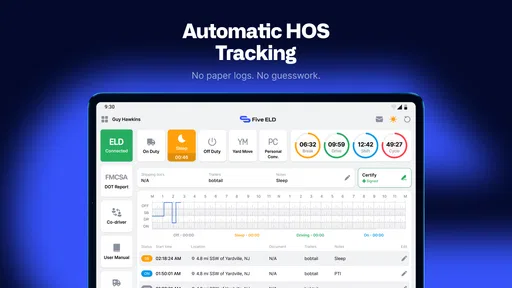
Five ELD Driver is designed to help commercial drivers manage electronic logging device requirements from a mobile device. After connecting with a compatible ELD system, it can record driving activity, track hours of service, display duty-status information, and help drivers review their logs. It is intended to make daily logging more organized, although drivers should always verify that the app is correctly connected and recording data before starting a trip.
Is Five ELD Driver compatible with every truck or ELD device?
No, compatibility may depend on the ELD hardware, fleet configuration, operating system, and account provided by the carrier or service administrator. The app is generally used as part of a specific ELD platform rather than as a universal replacement for every device. Before downloading, drivers should confirm that Five ELD Driver is supported by their company and compatible with the truck’s installed equipment.
Can drivers use Five ELD Driver without an internet connection?
Some functions may remain available when connectivity is limited, but full synchronization, data transmission, account verification, and communication with fleet systems can require an internet connection or Bluetooth connection to the ELD hardware. Drivers should not assume that offline use provides complete functionality. It is important to check whether logs have synchronized successfully and to follow the company’s procedure whenever the app, phone, or ELD loses connection.
Does Five ELD Driver help with hours-of-service compliance?
The app can assist by recording duty status, showing available driving time, and organizing electronic logs, but it does not replace the driver’s responsibility to comply with applicable regulations. Incorrect vehicle information, missed status changes, poor connectivity, or failure to review the log can lead to inaccurate records. Drivers should inspect their logs regularly, make permitted corrections, and contact their fleet administrator when something appears wrong.
What should I check before downloading and using Five ELD Driver?
Before installing Five ELD Driver, confirm that your carrier or fleet manager uses this platform and can provide the required login details or activation instructions. Check your phone’s operating-system compatibility, allow the necessary Bluetooth, location, and notification permissions, and make sure the device has enough battery for a full shift. You should also review the app’s privacy practices and understand how driving and account data are handled.


